DeskPixel Documentation
Marketing OS
The Brand Kit
Your voice, colours, hashtags, and rules — loaded into every agent so output stays on-brand.
The Brand Kit stores your brand voice, colours, hashtags, audience personas, and rules in one place. It's loaded into every agent's instructions, so the work stays on-brand without you repeating yourself in each chat.
Where to find it
Open the Brand Kit from the Marketing OS in your workspace. You can keep a separate brand kit for each project.
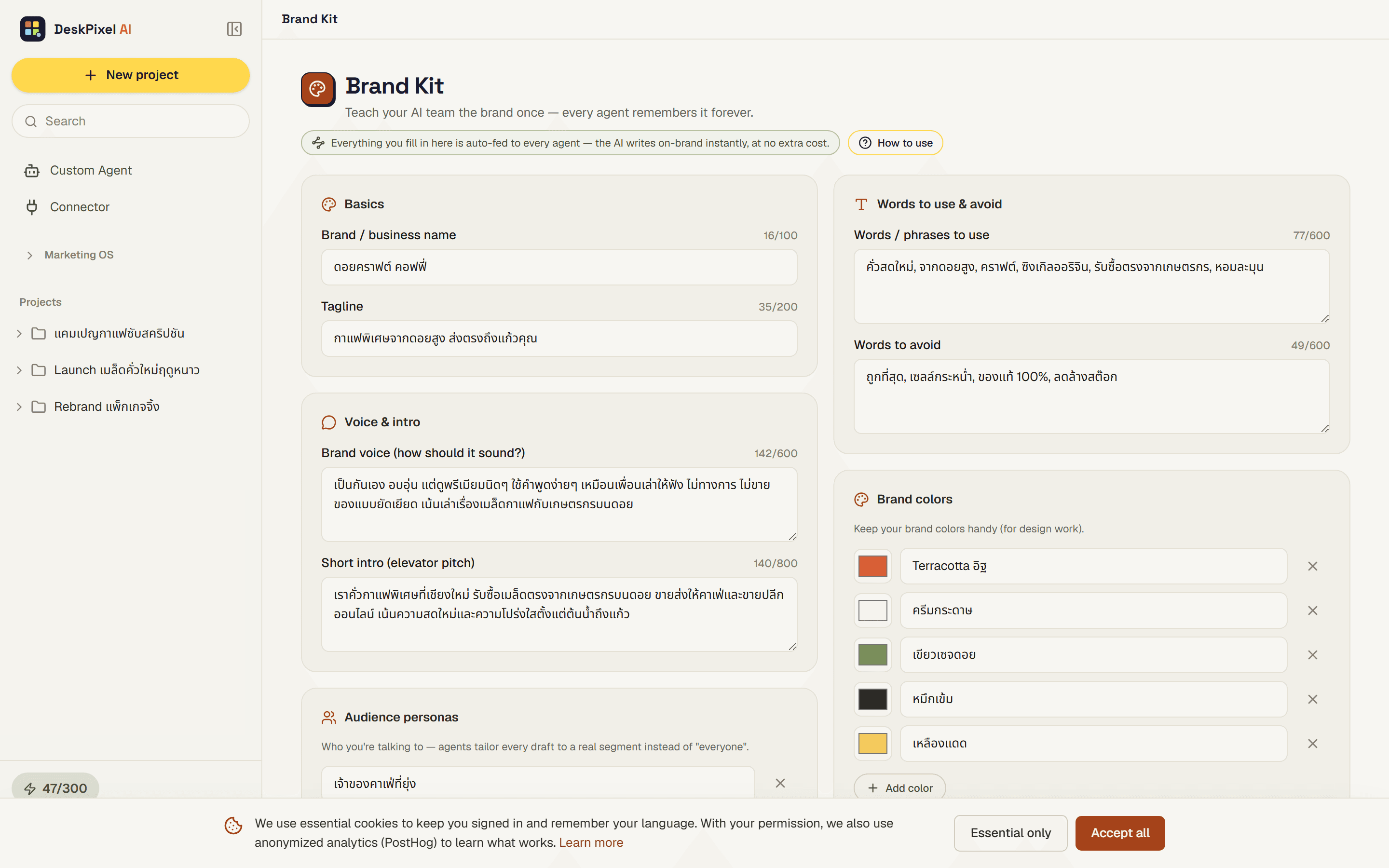
What goes in it
- Your brand voice and tone.
- Brand colours.
- Hashtags you use.
- Audience personas.
- Rules the team should follow.
How agents use it
The brand kit is loaded into every agent's instructions, so output reflects your voice and rules on its own. You can also toggle whether a given chat uses the brand kit, which is handy when you want to step outside your usual style for a one-off.
Tips
- Keep a brand kit per project so each brand you run stays distinct.
- Fill in audience personas. They help the team write for the right reader, not a generic one.
- Turn the brand kit off for a single chat if you're experimenting with a different voice.
Requirements
Available on every plan.